
What Is IPTV?
If you’ve heard the term “IPTV” but aren’t sure what it actually means, you’re not alone. IPTV is quickly replacing traditional cable and satellite TV for millions of viewers worldwide — and understanding how it works is the first step to deciding if it’s right for you.
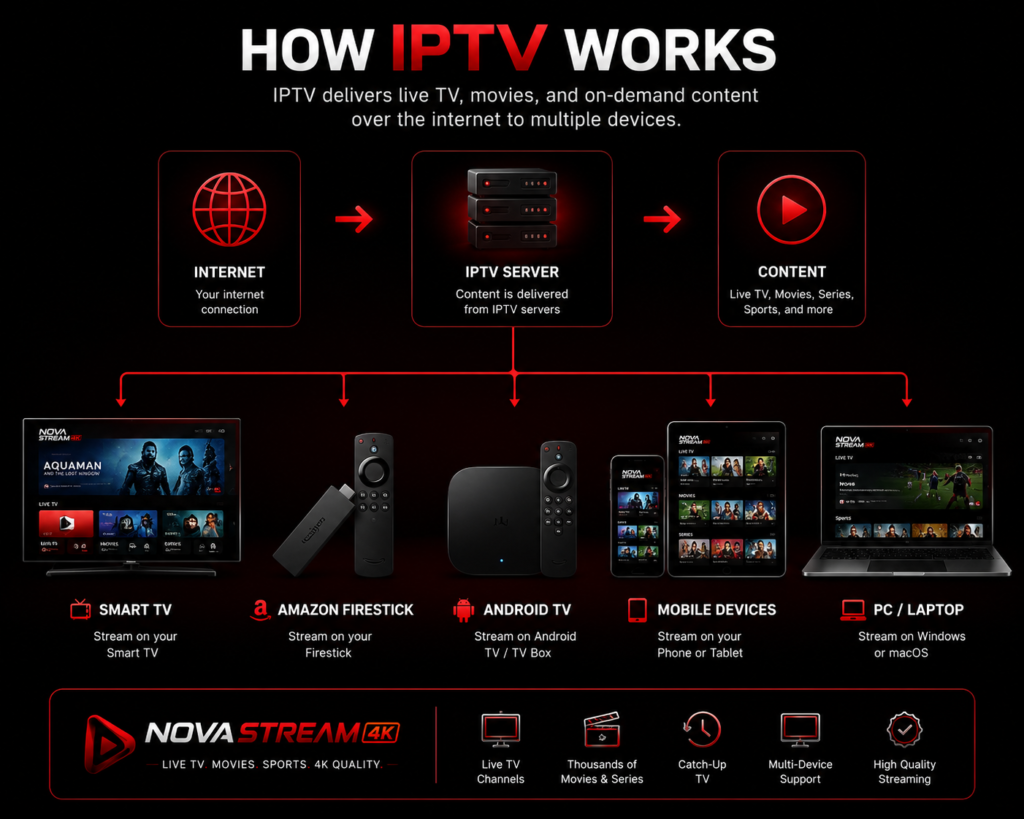
IPTV (Internet Protocol Television) is a way of delivering television content over the internet instead of through traditional cable or satellite signals. Instead of receiving channels through a cable box or satellite dish, IPTV streams live TV, movies, and shows directly to your device using your internet connection.
How Does IPTV Work?
Traditional TV sends the same broadcast signal to every household at once, whether you’re watching or not. IPTV works differently — content is delivered as data packets over the internet, sent specifically to your device when you request it, similar to how a website loads when you click a link.
Getting started is simple:
- Connect your device to the internet.
- Install a compatible IPTV player app.
- Enter your subscription details.
- Start streaming instantly.
This is why IPTV needs a stable internet connection to work well. The faster and more reliable your connection, the smoother your streaming experience — especially for HD, Full HD, 4K, or 8K content.
The Three Main Types of IPTV Content
IPTV isn’t just one type of service — it generally includes three formats, often bundled together in a single subscription:
- Live TV — Channels broadcast in real time, just like traditional cable, but delivered over the internet. This includes news, sports, entertainment, kids’ programming, music, and international channels.
- Video on Demand (VOD) — A library of movies and full TV series you can watch anytime, similar to Netflix or Amazon Prime Video, with libraries updated regularly.
- Catch-Up TV / Time-Shifted TV — Lets you watch a program that already aired, within a certain time window after broadcast, without needing to record it yourself.
What Do You Need to Use IPTV?
Getting started with IPTV is simpler than most people expect. You typically need:
- A reliable internet connection — a minimum of 15–25 Mbps is recommended for smooth HD/4K streaming, especially if multiple devices are connected.
- A compatible device — Smart TVs, Amazon Firestick, Android TV, Google TV, smartphones, tablets, Windows/macOS computers, and MAG boxes can all run IPTV.
- An IPTV player app — software that lets you load and organize your channels and content (most providers include setup instructions for this).
- A subscription — access credentials (often a username/password or an M3U playlist link) provided by your IPTV service.
No satellite dish, no cable installation, and no long-term contract with a cable company required — which is a big part of why IPTV has grown so quickly as a cable alternative.
Read next: IPTV Firestick Setup: Complete Step-by-Step Guide (2026)
What Internet Speed Do You Need?
Streaming quality depends largely on your internet connection. As a general guide:
| Quality | Recommended Speed |
|---|---|
| SD | 10 Mbps |
| HD | 15–20 Mbps |
| Full HD | 20–30 Mbps |
| 4K | 30 Mbps or higher |
A wired Ethernet connection, or a strong dedicated Wi-Fi signal, usually provides the most stable streaming experience — particularly if several people in the household are streaming different content at the same time.
IPTV vs. Cable vs. Streaming Apps: What’s the Difference?
It’s easy to confuse IPTV with services like Netflix or Disney+, but they’re not quite the same thing:
| Traditional Cable | Streaming Apps (Netflix, etc.) | IPTV | |
|---|---|---|---|
| Delivery | Satellite/cable signal | Internet, single platform | Internet, all-in-one |
| Live channels | Yes | Rarely | Yes |
| On-demand library | Limited | Yes | Yes |
| Installation | Technician required | None | None |
| Flexibility | Low | Medium | High |
| Contracts | Often long-term | Monthly, per app | Flexible plans |
In short: cable is broadcast-based and inflexible, standalone streaming apps focus mostly on on-demand libraries, and IPTV combines live channels and on-demand content into one internet-based package — often at a lower cost than stacking multiple subscriptions.
Want the full breakdown? Read: IPTV vs Cable TV: Which Is Better?
Is IPTV Legal?
This is one of the most common questions people have, and the honest answer is: it depends. IPTV as a technology is completely legal — it’s simply a method of delivering television over the internet, the same technology many official cable and telecom providers use themselves. The legality question usually comes down to content licensing: whether the specific provider has the rights to distribute the channels and content they’re offering, which varies by service and by country.
Regulations also differ by region, so it’s worth understanding your local laws before subscribing to any service. If you’re evaluating a provider, look for transparency about their service, responsive customer support, and realistic (not suspiciously cheap) pricing — these are generally better trust indicators than marketing claims alone.
Choosing the Right IPTV Provider
Not all IPTV services are the same, and picking the right one makes a real difference in your day-to-day experience. When comparing providers, consider:
- Content selection — live channel count, VOD library size, and whether the sports/entertainment you actually watch is included
- Device compatibility — make sure it works with the devices you already own
- Streaming quality and stability — look for providers offering HD, Full HD, and 4K with minimal buffering
- Customer support — responsive, 24/7 support matters if something goes wrong
- Activation time — how quickly you can start watching after subscribing
- Subscription flexibility — 1, 3, 6, and 12-month options let you test a provider before committing long-term
- Free trial availability — a strong signal of a provider confident in their service
- Refund policy — a clear money-back guarantee reduces risk
Read next: How to Choose the Best IPTV Subscription
Frequently Asked Questions
What does IPTV stand for? IPTV stands for Internet Protocol Television — a method of delivering television content over an internet connection rather than through traditional cable or satellite infrastructure.
Is IPTV free? Some free, ad-supported IPTV apps exist, but most reliable IPTV services with premium channels, VOD libraries, and dedicated customer support operate on a subscription basis.
Do I need a VPN for IPTV? Not always, but many users choose to use one for added privacy and to reduce the chance of ISP throttling during streaming.
What’s the difference between IPTV and a Smart TV app? Smart TV apps (like a built-in Netflix or YouTube app) are single-platform services built into your TV’s operating system. IPTV is a broader delivery method that can be accessed through many different apps and devices, and typically bundles live TV with on-demand content in one subscription.
What internet speed do I need for IPTV? For SD/HD content, 10–25Mbps is generally sufficient. For 4K streaming, or multiple simultaneous devices, a faster connection of 30Mbps or higher is recommended.
Can I use IPTV on multiple devices? This depends on your provider’s plan — some allow multiple simultaneous connections, others restrict to one device at a time, so check the plan details before purchasing.
Conclusion
IPTV has transformed how people access live television and on-demand entertainment by using the internet instead of traditional cable or satellite infrastructure. With support for a wide range of devices, flexible subscription options, and extensive content libraries, it’s become one of the most popular ways to watch TV in 2026.
If you’re considering an IPTV service, take the time to compare content selection, device compatibility, support quality, and subscription options to find the solution that best fits your needs.
Ready to see IPTV in action? Start your free trial or explore our subscription plans.
One Response